


Interior AI - AI Home Design
4.699.00 Reviews
App Specs
- Version
- 1.1
- Updated On
- License
- Free
- Downloads
- 500,000+
- Developer
- BIVEX
- Categories
- Photography
- Platform
- Android
Screenshots
 Analysis by AppCompare
Have you ever stared at your living room and thought, "This space could use a little magic"? Well, that's where Interior AI - AI Home Design steps in! Let me walk you through my experience with this nifty app and how it can transform your home design dreams into a reality.
Getting Started with Your Virtual Interior Designer
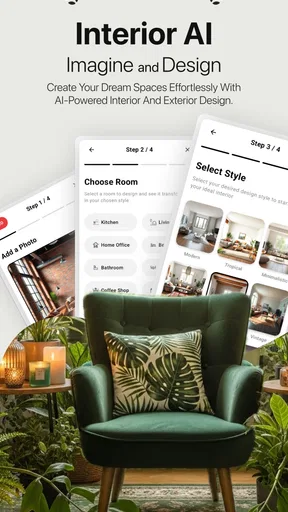
Opening the app for the first time, I was greeted by a sleek and intuitive interface. The onboarding process was a breeze, guiding me through the core features without overwhelming me with information. The app feels like having a personal interior designer right in your pocket. With just a few taps, you're ready to dive into a world of endless design possibilities.
The Magic of AI in Home Design
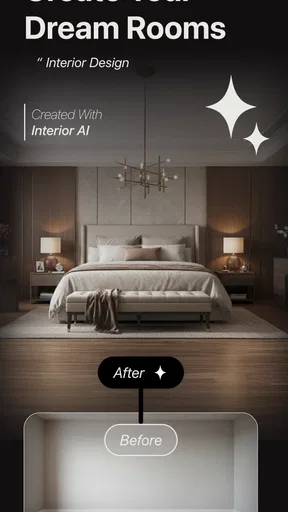
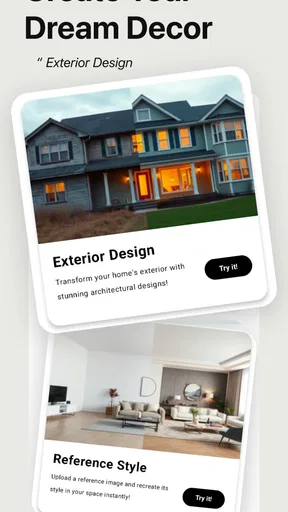
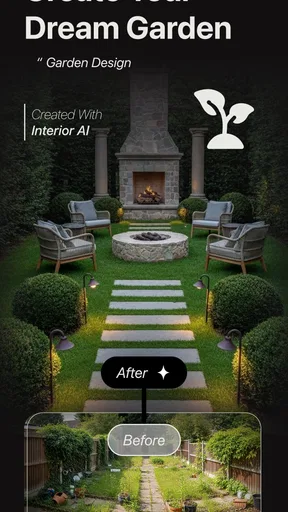
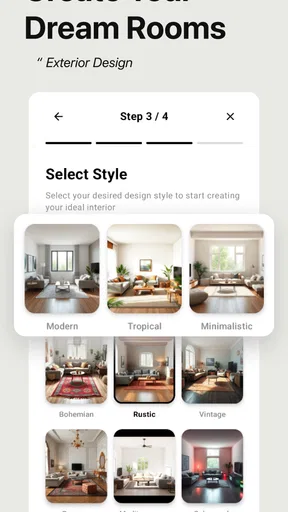
This is where Interior AI - AI Home Design really shines. The app uses advanced AI algorithms to provide design suggestions that are surprisingly spot-on. Simply snap a photo of your room, and the app generates multiple design themes tailored to your space. Whether you're into minimalist chic or a bohemian vibe, there's something for everyone.
What amazed me the most was how the app considered the existing elements in the room, like furniture and lighting, and suggested designs that enhanced the overall aesthetic. It’s like having a professional designer analyze your space without stepping a foot inside your home.
Exploring Design Themes
Once you upload a photo, the app offers a plethora of design themes. Each theme is rich in detail, showing you exactly how your room could look with different layouts, colors, and decor items. I found myself scrolling through countless options, each more inspiring than the last. It’s like window shopping for your dream home design!
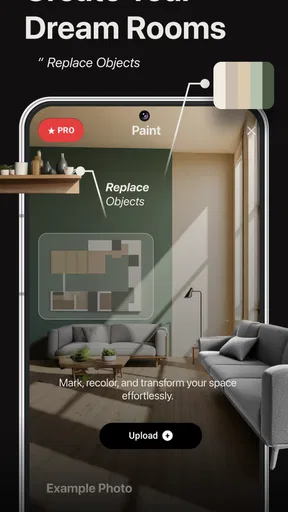
The app also allows you to customize these themes. Want a different color scheme or a specific piece of furniture? No problem! The customization tools are user-friendly and let you tweak every aspect to your heart’s content.
Practical Features for Real-Life Implementation
One of the standout features for me was the shopping list functionality. After selecting a design, the app generates a list of all the items needed to bring your vision to life. Each item is linked to online retailers, making it easy to purchase everything you need with just a few clicks. It takes the guesswork out of home shopping, saving you time and effort.
Worth Reading Before You Choose

EA SPORTS FC Mobile 26 Is a Bigger Football Game, but It Takes Time

Flipboard Shows What News Apps Must Do Beyond the Feed

Switching to Android Auto Means Rethinking Your Driving Routine

Google Calendar Makes a Crowded Week Easier to Manage

Ludo King Makes the Most of the Minutes Between Plans

Baby Panda World Brings Quick Play to Modern Phones, but Its Game Library Feels Busy
Moreover, the app includes a budget tracker. This feature helps you manage your expenses and ensures you don’t go overboard with your spending. It's a practical tool that keeps your design aspirations grounded in reality.
Sharing and Collaborating Made Easy
Have you ever wanted to get a second opinion on your design ideas? The app makes it easy to share your creations with friends or family. You can send them a link or post directly to social media, inviting feedback and suggestions. It’s a fun way to involve others in your design journey and maybe even discover new ideas you hadn’t considered before.
Plus, if you’re working with a professional designer, you can easily share your ideas and collaborate in real-time, making the design process more efficient and cohesive.
Final Thoughts
In the end, Interior AI - AI Home Design is more than just an app; it’s a gateway to a beautifully designed home. Whether you’re looking to refresh a single room or redesign your entire home, the app provides all the tools you need to bring your vision to life. With its intuitive interface, powerful AI, and practical features, it’s like having a design expert on call 24/7.
If you’re ready to transform your space and see your home in a whole new light, give this app a try. It’s an exciting blend of technology and creativity that might just make you fall in love with your home all over again.
Pros
- User-friendly interface for easy navigation.
- Wide range of design templates available.
- AI suggestions improve over time.
- Customizable options for personalization.
- No prior design experience needed.
Cons
- Some features require in-app purchases.
- Occasional AI glitches in design suggestions.
- Limited free template options.
- Requires a stable internet connection.
- Can be resource-intensive on older devices.
FAQs for Interior AI - AI Home Design
What is Interior AI and how does it work?
Interior AI is an innovative application that leverages artificial intelligence to assist users in designing their home interiors. By offering a range of styles and design options, the app allows users to upload photos of their rooms and receive AI-generated suggestions for furniture placement, color schemes, and decor enhancements. It’s an excellent tool for anyone looking to refresh their living spaces with minimal effort.
Is Interior AI user-friendly for beginners in home design?
Yes, Interior AI is designed with user-friendliness in mind, making it accessible to both beginners and experienced home designers. The intuitive interface guides users through each step, from uploading photos to exploring design options. The app’s AI-driven suggestions are easy to understand and implement, ensuring a seamless experience regardless of your design expertise.
Can I customize the design suggestions provided by Interior AI?
Absolutely. While Interior AI provides initial suggestions based on the AI analysis of your space, users have the flexibility to customize these ideas to better fit their personal taste and needs. You can adjust colors, furniture styles, and placements to create a design that truly reflects your vision. The app encourages creativity while providing a solid starting point.
Does Interior AI support different interior design styles?
Yes, Interior AI supports a wide range of interior design styles, from modern and minimalist to classic and eclectic. Users can explore various themes and apply them to their spaces to see which best suits their preferences. The app continuously updates its library to include the latest design trends, ensuring users have access to fresh and contemporary ideas.
Is there a cost associated with using Interior AI?
Interior AI offers both free and premium features. The free version provides basic design suggestions and limited customization options. For a more comprehensive experience with advanced features, users can opt for a subscription that unlocks additional design tools and style options. Pricing details are available within the app, allowing users to choose a plan that fits their budget.


